
Download RightClickYoutubeSummary – Instant YouTube Video Summaries, Free Chrome Extension
Overview
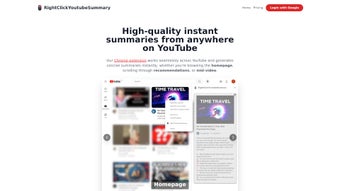
RightClickYoutubeSummary is a powerful Chrome extension that brings instant, high‑quality summaries to every YouTube video you encounter. By simply right‑clicking on a video thumbnail or the player itself, the tool generates a concise paragraph that captures the core ideas, key arguments, and notable details without the need to watch the entire clip. Designed for both casual viewers and professionals who rely on video content for research, learning, or market analysis, this extension saves valuable time while keeping you informed. The free tier offers a limited number of daily summaries, while paid plans unlock higher limits, priority processing, and additional customization options such as summary length and language preference. Integration is seamless: the extension appears as an overlay button on YouTube’s homepage, watch pages, recommendation feeds, and even on embedded videos across other sites. Its user‑friendly interface requires no technical expertise—just a click, and the summary appears in a clean pop‑up that can be copied, shared, or exported. By condensing hours of video content into a few readable lines, RightClickYoutubeSummary enhances productivity, supports faster decision‑making, and reduces screen fatigue, making it an essential companion for anyone who spends a significant portion of their day on YouTube.
Key Features
- Instant summaries generated with a single right‑click on any YouTube video.
- AI‑driven natural language processing for accurate, context‑aware summaries.
- Free tier with up to 5 summaries per day; premium plans up to 100+ summaries.
- Customizable summary length (short, medium, long) to match user preferences.
- Multi‑language support for non‑English videos, including Spanish, French, German, and more.
- Seamless integration with YouTube’s UI – appears on the home page, watch page, and recommendation feeds.
- One‑click copy to clipboard and easy sharing to email, Slack, or project management tools.
- Secure handling of video data – no personal video content is stored on external servers.
- Regular automatic updates to keep up with YouTube UI changes.
- Lightweight footprint (under 2 MB) ensures fast loading and minimal impact on browser performance.
Installation & Usage Instructions
Getting started with RightClickYoutubeSummary is straightforward and takes only a few minutes. First, open the Chrome Web Store and search for “RightClickYoutubeSummary.” Click the “Add to Chrome” button and confirm the permission request, which includes access to YouTube pages for seamless integration. Once installed, you’ll notice a new icon in the Chrome toolbar, indicating the extension is active.
To generate a summary, navigate to any YouTube video – whether on the main watch page, a playlist, or a recommended thumbnail. Right‑click on the video thumbnail or the player area and select “Generate Summary” from the context menu. The extension will analyze the video’s transcript (or audio using speech‑to‑text when a transcript isn’t available) and display a concise summary in a pop‑up window anchored near the video. The pop‑up includes three buttons: “Copy,” “Share,” and “Adjust Length.” Clicking “Copy” copies the text to your clipboard, “Share” opens a quick‑share dialog for email or messaging apps, and “Adjust Length” lets you toggle between short, medium, and long versions of the summary.
Premium users enjoy additional controls: they can set a daily limit, prioritize certain channels for faster processing, and choose a custom language model for specialized jargon (e.g., technical, medical, or legal terms). All settings are accessible via the extension’s options page, reachable by right‑clicking the toolbar icon and selecting “Options.” Here you can also review usage statistics, upgrade your plan, and enable or disable automatic summary generation on specific YouTube sections.
Compatibility, Pros & Cons
RightClickYoutubeSummary is built exclusively for the Google Chrome browser, which runs on Windows, macOS, Linux, Chrome OS, Android (via Chrome), and iOS (via Chrome). Because the extension relies on Chrome’s extension APIs, it is not compatible with other browsers such as Firefox, Safari, or Edge (unless Edge is running in Chromium mode, in which case it may work but is not officially supported). The lightweight design ensures it works smoothly on older hardware and low‑end devices, making it a versatile tool for a wide range of users.
Pros
- Instant, accurate summaries that save time.
- Free tier available for casual users.
- Multi‑language support expands global usability.
- Customizable summary length to fit different needs.
- Secure, no video content is stored externally.
- Lightweight and fast, with minimal impact on browser performance.
- Regular updates keep the extension compatible with YouTube changes.
- Easy sharing and copying functionality for workflow integration.
Cons
- Only works in Chrome; no native support for Firefox or Safari.
- Free tier limits daily summaries, which may be restrictive for power users.
- Reliance on YouTube transcripts can affect accuracy for videos without subtitles.
- Premium plans require a subscription, which might deter occasional users.
- Complex technical jargon may occasionally be oversimplified.
RightClickYoutubeSummary stands out as a practical, time‑saving Chrome extension that transforms how we consume video content. Its AI‑driven summarization engine is impressively accurate for most mainstream videos, and the user interface feels natural within YouTube’s ecosystem. While the free tier’s daily limit could be a bottleneck for heavy users, the premium options provide generous allowances and additional customization. The only notable drawback is its Chrome‑only availability, which excludes a segment of the market still using Firefox or Safari. Overall, the extension delivers on its promise of instant, concise summaries, making it a worthy addition to any knowledge‑worker’s toolkit.
Frequently Asked Questions (FAQ)
How does RightClickYoutubeSummary generate its summaries?
The extension uses a combination of YouTube’s auto‑generated transcript (when available) and an advanced AI language model that processes the audio via speech‑to‑text. The AI then extracts key points, condenses them, and returns a readable paragraph tailored to the selected summary length.
Is my data private when using the free version?
Yes. RightClickYoutubeSummary processes video data locally in the browser and only sends the transcript text to the AI service for summarization. No video files or personal browsing data are stored on external servers.
Can I use the extension on mobile devices?
The extension works on Chrome for Android and iOS, but because mobile browsers have limited extension support, you’ll need to enable “Desktop site” mode or use Chrome’s “Extensions” feature on tablets that support it.
What happens if a video has no transcript?
When a transcript isn’t available, the extension falls back to real‑time speech‑to‑text conversion. This may take a few extra seconds, and the accuracy depends on audio clarity, but most users find the results still useful.
How can I upgrade to a premium plan?
Open the extension’s options page by right‑clicking the toolbar icon and selecting “Options.” Under the “Subscription” tab, choose a plan (Monthly or Annual) and follow the secure checkout process powered by Stripe. Once completed, your account is instantly upgraded.
Conclusion & Call to Action
In today’s fast‑paced digital environment, the ability to skim through video content without sacrificing comprehension is a game‑changer. RightClickYoutubeSummary delivers precisely that—a quick, reliable, and secure way to transform YouTube videos into bite‑size summaries with a single right‑click. Whether you’re a student extracting lecture highlights, a marketer researching competitor videos, or a professional staying current on industry trends, this Chrome extension helps you cut through the noise and focus on what truly matters. The free tier provides a risk‑free introduction, while the premium plans unlock higher limits and deeper customization for power users. Ready to reclaim hours of scrolling and watching? Click the “Add to Chrome” button now, install RightClickYoutubeSummary, and start turning YouTube’s endless stream of content into concise, actionable insights.



.png)



